Overview
MCP access is one of the most workflow-changing capabilities in Provalytics. It gives compatible AI assistants direct, read-only access to live Provalytics data through the Model Context Protocol, so teams can ask questions in conversation instead of exporting files, building one-off spreadsheets, or writing ad hoc queries. This is where many marketing and agency teams save hours each day.Why this matters
With MCP access, an assistant can answer questions like:- What are our top channels by incrementality this month?
- What does the optimizer recommend next?
- Which campaigns are underperforming relative to spend?
- How well did the latest model fit actual results?
- ask
- inspect
- decide
- export
- clean
- reconcile
- summarize
- then decide
What MCP access unlocks
MCP access is especially useful for:- agency teams building faster client readouts
- marketers pressure-testing results before meetings
- planning teams comparing options without waiting for a custom export
- leadership support when a fast answer is needed from live data
How access works
Provalytics provides a client-scoped API key that authenticates requests to the Prova MCP server:https://mcp.getprova.com
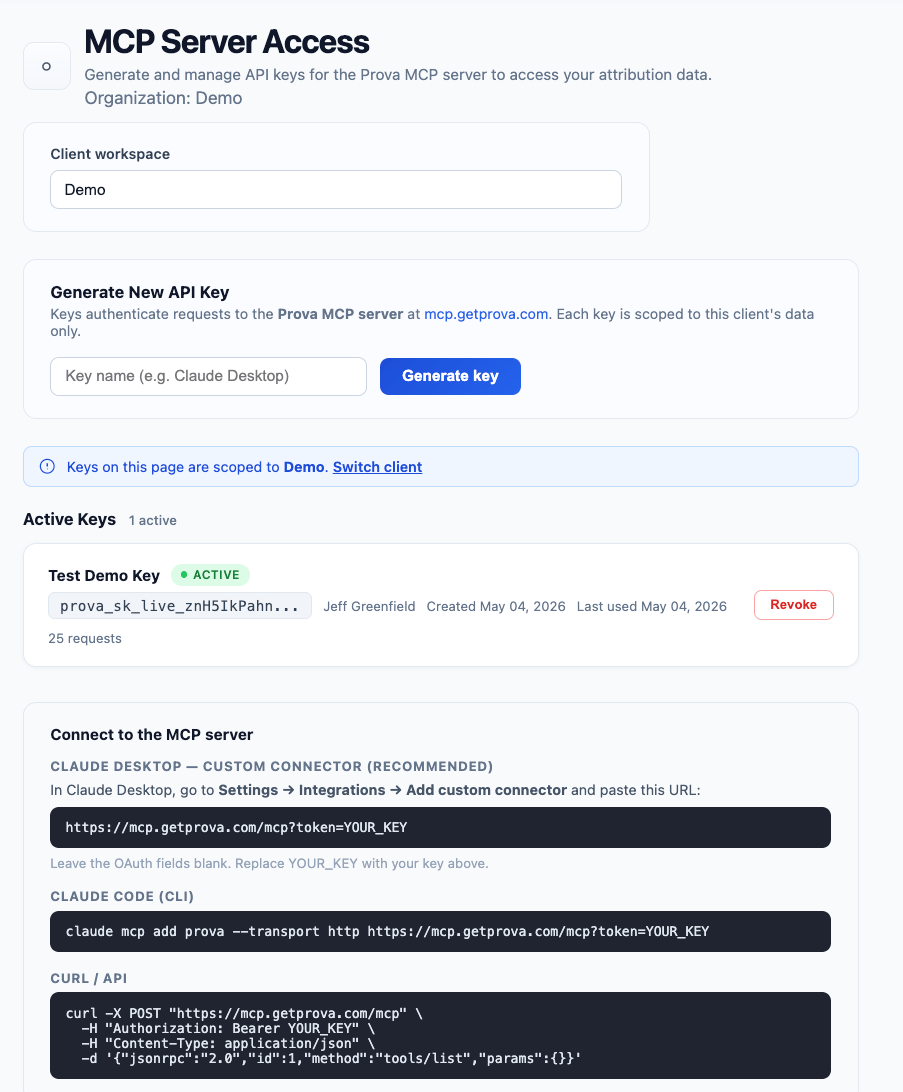
What the MCP access page looks like
The MCP Server Access page gives you everything needed to set up a client-scoped connection:- client workspace selector
- key generation form
- active keys list
- ready-to-use connection instructions for Claude Desktop
- CLI example for Claude Code
- raw API example for direct MCP requests
Before you connect
Before connecting Provalytics to Claude or ChatGPT, make sure you have:- access to the
MCP Server Accesspage in Provalytics - a client workspace selected
- a user-specific API key generated for your account
- a supported AI workspace that allows MCP or custom connector setup
Setup guides
Choose the guide that matches where you want to work:What data the assistant can access
The internal MCP feature spec currently exposes tools for questions about:- campaign performance
- incrementality
- recommendations
- marginal response
- categories / funnel data
- model predictions
- model statistics
- CPM
- days to conversion
- methodology
Security notes
- keys are client-scoped
- keys are read-only
- keys should be treated like credentials and not shared between users
- keys should be revoked when no longer needed
- usage can be monitored through the MCP usage view