Overview
Snowflake Delivery is the direct warehouse connection path for clients whose custom marketing, website, or conversion data already lives in Snowflake. This route is a strong fit when your team wants Provalytics to read from a curated Snowflake table instead of relying on recurring file exports.How it works
Provalytics connects to Snowflake using key-pair authentication. That means your team creates or provisions a service account in Snowflake, assigns the appropriate warehouse and read permissions, and shares the connection details needed for Provalytics to read from the source table.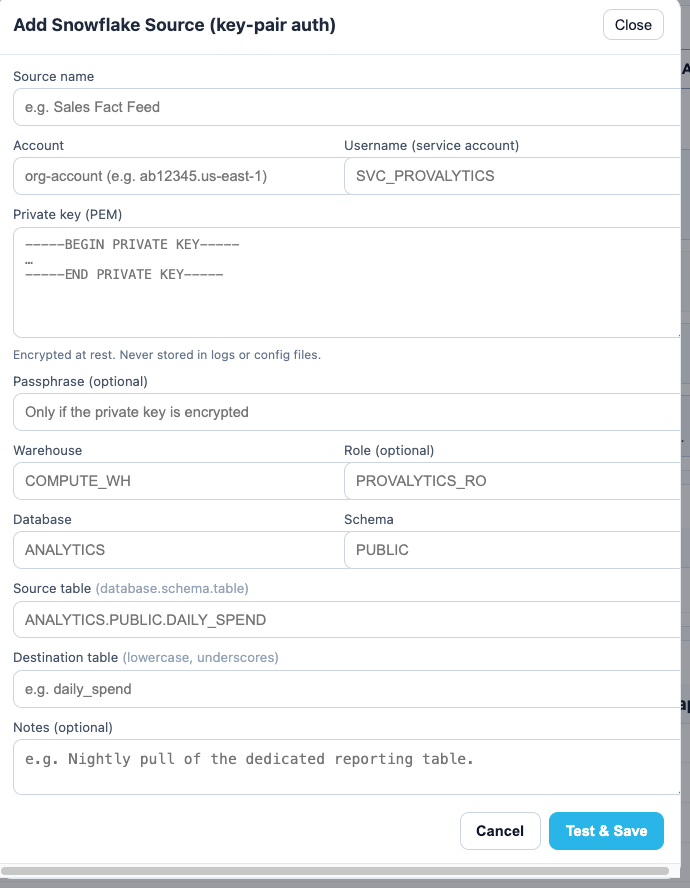
What your team will provide
To enable the connection, your team will typically provide:- a source name for the feed
- the Snowflake account identifier
- the service-account username
- the private key in PEM format
- the passphrase, if the private key is encrypted
- the warehouse name
- the read role
- the database
- the schema
- the source table in
database.schema.tableformat - the destination table name Provalytics should use
- optional notes about cadence or expected usage
Network requirement
Snowflake connections may also require your team to allowlist the Provalytics IP address. If your Snowflake environment restricts inbound access by IP, your CSR can provide the current allowlist details needed for setup. This is a Snowflake-side network requirement, and your CSR can help confirm whether it applies to your account.Security model
This connection is designed around scoped, read-only warehouse access. In practice, that usually means:- your team creates a dedicated Snowflake service account for Provalytics
- the service account is limited to the data Provalytics needs to read
- the private key is used for authentication instead of a shared password
- access can be rotated or revoked through your normal Snowflake controls
What it is best for
Snowflake Delivery is a strong fit when:- your source data already lives in Snowflake
- the dataset is custom or non-conforming and does not fit a native API connector
- the upstream team wants a direct warehouse read instead of a file drop
- the client wants a cleaner recurring operating model for custom data
Recommended operating model
This route works best when:- the source table is stable and curated for downstream use
- the schema remains consistent over time
- the service account is dedicated to Provalytics access
- your team coordinates table or schema changes before they go live