Overview
Provalytics supports several ways to bring marketing, website, and conversion data into the platform. The right connector depends on where your data lives, how often it updates, and whether Provalytics is pulling from a system directly or receiving curated files from your team. Supported options can vary by client configuration, but the main connection types in use today are below. The core principle is flexibility: if the data matters and can be delivered in a structured way, Provalytics can usually programmatically ingest it and make it usable for reporting, planning, and modeling. That flexibility comes from the platform’s custom data-layer foundation. Provalytics was built working with large enterprise clients, where important datasets often already exist but do not arrive through a clean native connector. The platform is designed to organize those structured sources into stable ingestion paths instead of forcing every client into the same connector model.Native platform connectors
For the most common recurring connector types, use these pages:- Google Ads
- YouTube
- Meta (Facebook & Instagram)
- TikTok
- Snapchat
- Amazon Ads
- Google Analytics 4
- Adobe Analytics
- Shopify
Windsor
Windsor is used when Provalytics needs a managed marketing-data connection for supported ad platforms and related sources. This is typically the best fit when:- media data needs to be refreshed on a recurring schedule
- the client wants a managed connector workflow rather than file delivery
- multiple paid media sources need to be normalized into a usable feed
Connecting your marketing and analytics platforms
After selectingConnect Accounts, you are guided through a simple authorization flow.
First, you grant your Provalytics workspace permission to access the accounts you choose to share.
Your login credentials are never shared with Provalytics. Only the specific accounts you authorize are made available to the workspace.
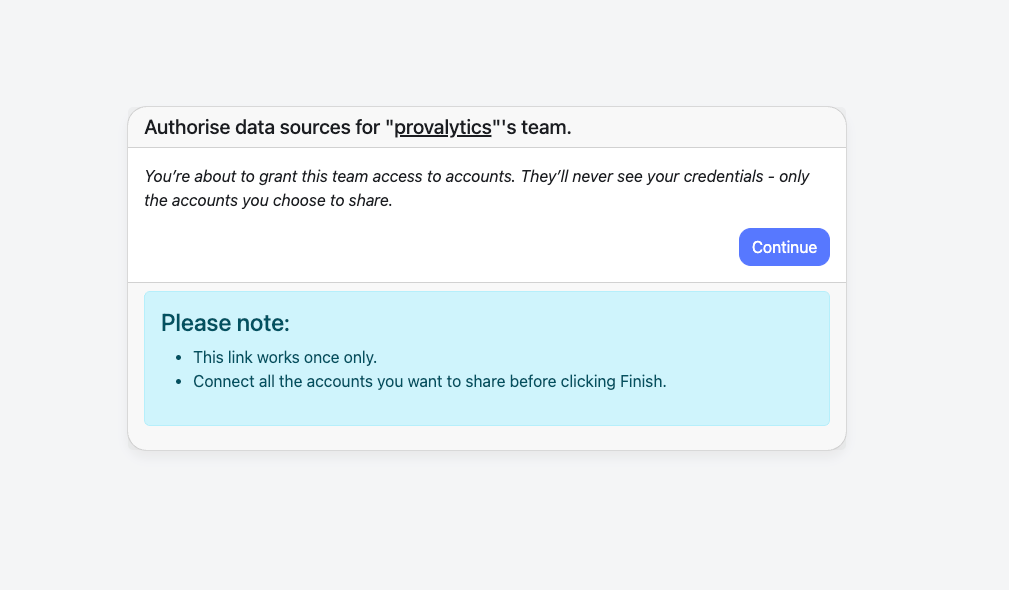
- Click
Continueto begin authorizing your accounts. - Your credentials remain private. Only selected accounts are shared.
- Google Ads
- Google Analytics 4
- Facebook Ads
- YouTube
- and other supported sources
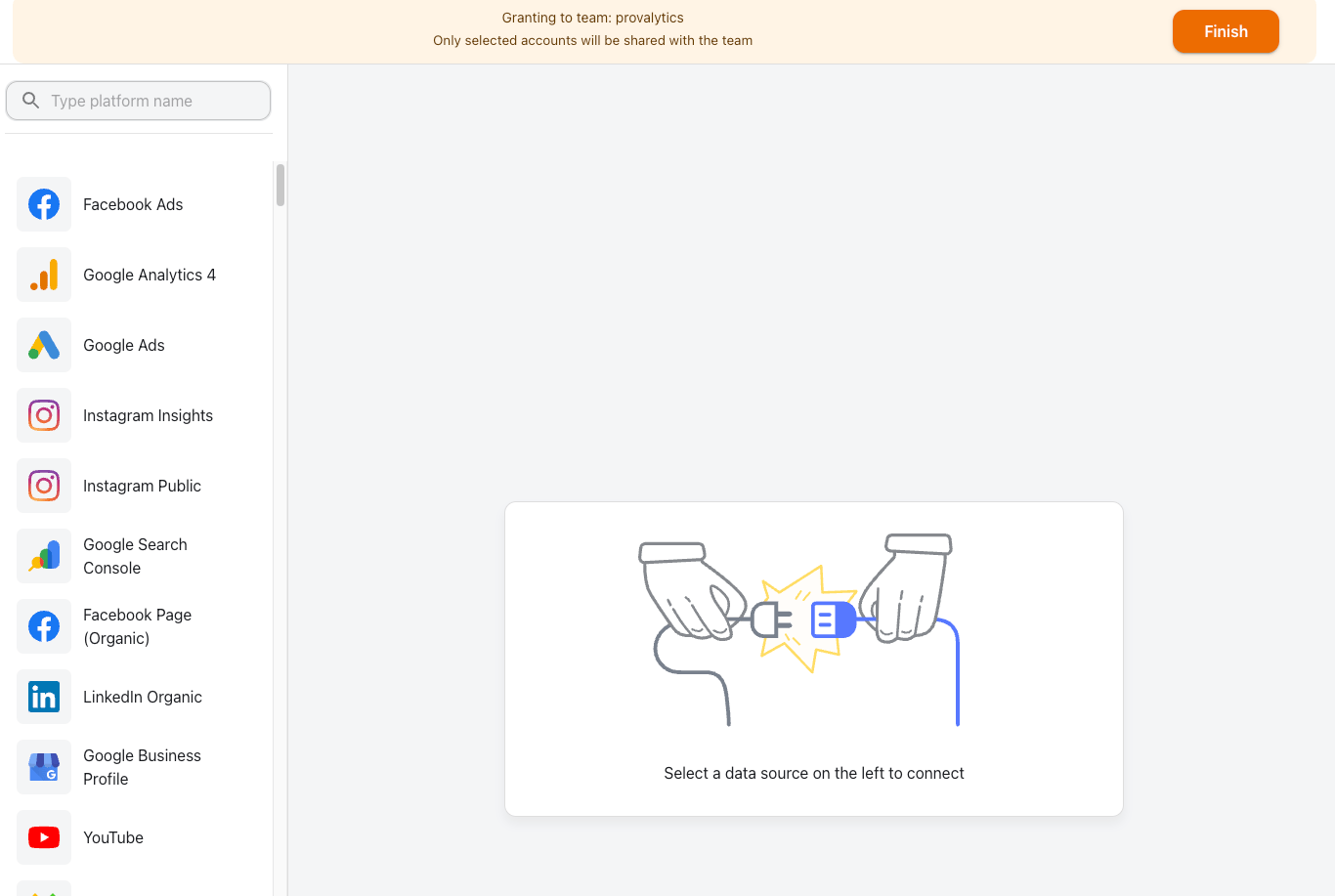
- Choose the platform you want to connect.
- Complete the provider’s authorization flow.
- Repeat for any additional marketing or analytics platforms.
- Click
Finishwhen you’ve connected all the accounts you want to share.
Custom & non-conforming data
If your source does not fit a native API connector, Provalytics can still ingest it through a structured custom-data workflow. Use these pages when the data is custom, warehouse-derived, file-based, or otherwise non-conforming:- Custom & Non-Conforming Data
- Direct Mail
- Radio
- Linear TV
- Snowflake Delivery
- BigQuery Delivery
- Google Sheets Delivery
- SharePoint Delivery
- S3 Bucket Delivery
- Recurring Email Delivery
- Manual File Uploads
Snowflake Delivery
Snowflake Delivery is used when curated custom data already lives in Snowflake and Provalytics should read from that warehouse directly using a dedicated service account and key-pair authentication. This is a strong option when:- the client already manages reporting tables in Snowflake
- the source is custom marketing, website, or conversion data
- the team prefers a direct warehouse connection over recurring file delivery
BigQuery Delivery
BigQuery Delivery is used when data already lives in a curated warehouse table and Provalytics can read from that source directly. This is a strong option when:- a client or partner already maintains clean reporting tables
- Provalytics should consume curated data rather than raw platform data
- the source needs to support marketing, website, or conversion layers from a warehouse
SharePoint Delivery
SharePoint Delivery is used for file-based delivery when the client maintains recurring CSV or spreadsheet exports in a shared Microsoft environment. This is a strong option when:- the client already has an established SharePoint workflow
- files are updated on a recurring cadence
- the source is easier to deliver as a file than as a direct system connection
S3 Bucket Delivery
S3 Bucket Delivery is used when a client or partner wants to push recurring files into a Provalytics-managed S3 destination for automatic daily retrieval. This is often the cleanest option when:- the source comes from a warehouse or another custom data process
- recurring daily file drops are available
- the upstream team wants a secure push destination instead of a direct connector
Recurring Email Delivery
Recurring Email Delivery is used when recurring files or retrievable links are sent to Provalytics through an email-based delivery workflow. This is useful when:- recurring data can be sent by email
- the source is easier to deliver as a file or retrievable link than through a direct connector
- the workflow is more manual than a direct connector or bucket delivery
Google Sheets Delivery
Google Sheets Delivery can be used when a client maintains structured data in a shared sheet and Provalytics needs to ingest it as a source. This is usually best for:- lightweight operational data
- curated reference tables
- lower-volume data sources that are maintained manually
Linear TV
Linear TV is used when a client wants Provalytics to ingest broadcast or station-level TV data as a custom marketing source. This is a strong fit when:- the source does not come through a native API connector
- the data is already structured by channel, network or station, and creative
- the client can also provide daypart detail and wants Provalytics to preserve it
Channel -> Network / Station Name -> Creative, with dayparts included when available.
Radio
Radio is used when a client wants Provalytics to ingest terrestrial or satellite radio data as a custom marketing source. This is a strong fit when:- the source does not come through a native API connector
- the data is already structured by channel, station, and creative
- the client can also provide daypart detail and wants Provalytics to preserve it
Channel -> Station Name -> Creative, with dayparts included when available.
Direct Mail
Direct Mail is used when a client wants Provalytics to ingest mailed campaign data as a custom marketing source. This is a strong fit when:- the source does not come through a native API connector
- the data is already structured by channel, campaign, and creative
- the client wants the platform to evaluate Direct Mail alongside digital and offline channels
Channel -> Campaign Name -> Creative, with additional segmentation such as geography or audience included when available.
Shopify app
The Shopify app connection is used when Provalytics needs recurring ecommerce aggregates from a Shopify storefront. This is useful when:- Shopify is the core owned-commerce source
- daily aggregate conversion or revenue data should flow directly into Provalytics
- the client wants a repeatable ecommerce connection instead of file-based delivery
Manual File Uploads
Manual File Uploads are available when the best source format is a file that should be uploaded directly rather than connected through an automated route. This is often used for:- one-time historical backfills
- special offline datasets
- curated files that do not justify a persistent connector
What clients usually need to provide
Depending on the connector, clients may need to provide:- account access or permissions
- a file location or bucket path
- sample files
- table names or schema details
- a recurring delivery pattern